
Dance Studio Manager Time Saver
Go directly to member accounts or class details from the header search.
By default, when you use the search box at the top of Dance Studio Manager, clicking a member or class result usually opens a quick-edit popup first. That is useful when you want to make a fast update, but many studios mainly use the top search as a shortcut to jump directly into the full account or class page.
If that sounds like your staff workflow, DSM includes two settings that can remove the extra click and turn the top search into a faster navigation tool.
Default behavior
Search results usually open a quick-edit dialog or preview-style popup first.
Time-saving option
Redirect search clicks straight to the full member account or class details page.
Best for
Front desk staff and administrators who use the top search many times a day as a navigation shortcut.
What happens by default?
When these redirect settings are turned off, clicking a member result in the top search usually opens the member quick-edit popup first. From there, your staff can make a fast update or click into the full account page.
The same idea applies to classes. Clicking a class result can open the class edit popup first rather than taking you directly to the full class details page.
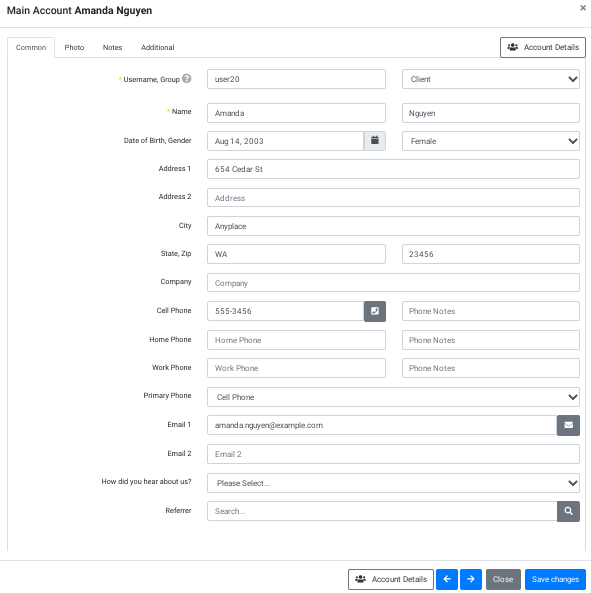
This default behavior is useful if your staff often searches because they want to change a phone number, email address, address, or another simple detail without leaving the current page.
Enable direct redirects from header search
Go to Settings and then Global Settings. Use the settings search box and search for Header or Search.
Look for these two settings:
- Header Search: Redirect To Member Account
- Header Search: Redirect To Class Details
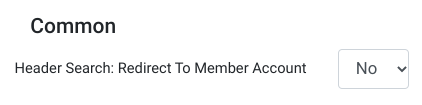
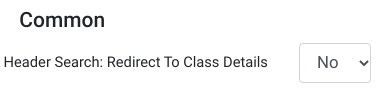
Header Search: Redirect To Member Account
Set this to Yes if you want member or student search results to open the full member account directly instead of the quick-edit popup.
Header Search: Redirect To Class Details
Set this to Yes if you want class search results to open the full class details page directly instead of the class edit popup.
After changing the settings, save your Global Settings.
What changes after you enable this?
When Header Search: Redirect To Member Account is set to Yes, clicking a member result can take you directly to the full account or details page, assuming the user has permission to access it.
When Header Search: Redirect To Class Details is set to Yes, clicking a class result can take you directly to the class details page instead of showing the popup first.
This is usually the better workflow when staff search mainly because they want to view the full ledger, family details, schedules, class details, attendance, or other full-page information.
What can the header search find?
The top search box can do more than just match first and last names. Depending on the user’s permissions and the result type, it can help locate:
- Member or student names
- Reverse name formats
- Email and secondary email
- Usernames
- Member IDs
- Phone fields
- Nicknames, when used
- Class codes
- Class IDs
- Instructor-related results, depending on permissions
That makes header search one of the fastest navigation tools in DSM, especially for busy front desk and admin users.
Permission note
The top bar search is also influenced by permissions. DSM includes a permission related to Search All (top bar search), along with member, instructor, and message search permissions. So results may vary depending on role.
When should you leave these settings off?
You may prefer to leave the redirect settings set to No if your staff usually searches because they want to make a quick edit without leaving the page they are on.
You will probably prefer to turn them On if your staff usually searches because they want to navigate into the full account or class page right away.
In practice, many studios eventually prefer direct redirect because the header search becomes more like a command bar than an edit launcher.
Would you like another time-saving idea after this one? Consider scheduled automatic payments if your team is still processing repeat charges manually.
If you prefer video, you can also follow this step-by-step guide on how to change the search redirect behavior.
Frequently asked questions about search redirects
Why does DSM open a popup when I click a search result?
That is the default behavior. DSM opens a quick-edit popup first so you can make a fast update without immediately leaving the page you are on.
Can I make search results open the full account page instead?
Yes. Set Header Search: Redirect To Member Account to Yes.
Can I make class search results open the class details page?
Yes. Set Header Search: Redirect To Class Details to Yes.
Where are these settings?
Go to Settings, then Global Settings, and search for Header or Search.
Should every studio enable this?
Studios that use the top search mostly as a navigation shortcut will probably prefer enabling it. Studios that use it mostly for quick edits may prefer leaving it off.