What Admin Notifications Do
Admin Notifications help studio staff stay informed when important activity happens in Dance Studio Manager. These email alerts can notify the studio when a new account is created, a class registration is submitted, a payment is received, a purchase is made, or a new class note is posted.
Where to Find These Settings
From the admin area, go to Settings > Messaging and look for the Admin Notifications section.
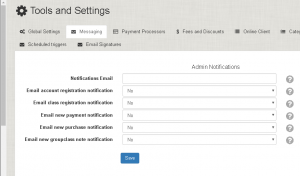
Available Admin Notification Options
- Notifications Email: The administrator email address used for notification messages, depending on the studio’s email setup.
- Email Account Registration Notification: Sends an email to the studio when someone creates an account through the Online Client.
- Email Class Registration Notification: Sends an email when someone registers for a class.
- Email New Payment Notification: Sends an email when a new payment is recorded.
- Email New Purchase Notification: Sends an email when a purchase is made through sales items, such as class cards, merchandise, or other items.
- Email New Group Class Note Notification: Sends an email when a teacher or staff member posts a new note for a class.
Related Messaging Settings
Admin Notifications are different from Client Notifications, which send messages to clients. For more flexible communication, you can also use Automated Messaging and message templates.
If you need help configuring email notifications or choosing which alerts to enable, please contact Dance Studio Manager support.