Dance Studio Manager Feature Guide
Charging for late cancels or no shows: build clear cancellation fee rules without confusing them with purchase refunds.
Dance Studio Manager can help studios manage late cancellations and no-shows by creating lesson cancellation fee policies. These rules are useful when you want to discourage students from holding reserved spots without attending, while still allowing flexibility for early cancellations or special situations.
A studio might allow Bronze Members three free no-shows per year and then charge a $15 fee for each additional no-show. Another studio might charge one amount for Late Cancel and a different amount for No Show, or use different rules for different member categories.
What this feature is for
- Late cancellation fees
- No-show fees
- Different rules by member category
- Grace periods before charges post
What it is not for
This is not the same thing as the Purchase Cancellation Fee, % setting used when cancelling or refunding a purchase.
How fees are defined
DSM uses a Cancellation Fee Values rule table with member category, lesson status, fee amount, charge category, and free cancellations per year.
Enabling lesson cancellation fees
To enable this feature, go to Settings, then Fees and Discounts, and find the Cancellation Fee section.
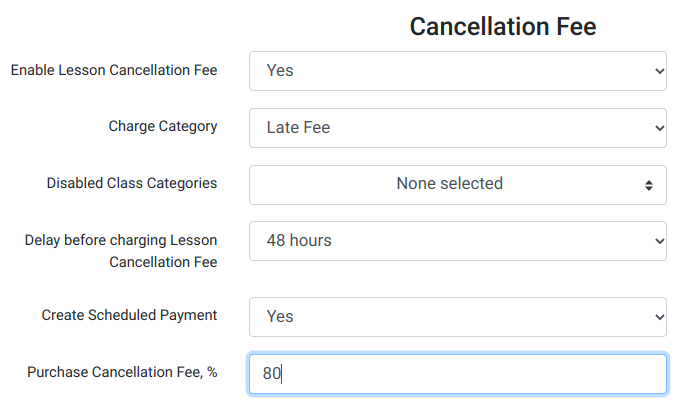
Set Enable Lesson Cancellation Fee to Yes. Once enabled, DSM can use fee rules tied to lesson cancellation or attendance statuses such as Late Cancel and No Show.
What the main settings mean
Enable Lesson Cancellation Fee
Turns the lesson cancellation and no-show fee system on or off.
Charge Category
If this field appears in your setup, choose the charge category to use for cancellation-fee charges. Some setups also allow charge categories to be chosen on each individual fee rule.
Disabled Class Categories
Use this to exclude certain class categories from cancellation fees. This is useful for trial classes, complimentary classes, camps, workshops, or other classes where the studio does not want to apply late-cancel or no-show fees.
Delay before charging Lesson Cancellation Fee
This works best as a grace period. DSM waits before turning the pending fee into a real charge, which gives your staff time to review, adjust, or remove the fee when there is a valid exception.
Create Scheduled Payment
This does not mean the fee is instantly charged in every case. Instead, once the cancellation fee becomes a real charge, DSM can also create a scheduled payment if the member has a saved default payment method.
Purchase Cancellation Fee, %
This is separate from lesson cancellation or no-show fees. It applies when cancelling or refunding a purchase and calculating how much of the purchase is retained as a cancellation fee.
Big distinction to keep straight
The Purchase Cancellation Fee, % setting is not the regular lesson no-show fee. It is tied to purchase cancellation and refund behavior. The actual late-cancel and no-show fee system uses the Cancellation Fee Values rules described below.
Adding cancellation fee rules
After enabling the feature, a Cancellation Fee Values section appears. This is where you define the actual fee rules that determine when and how a student is charged.
Click Add New to create a rule.
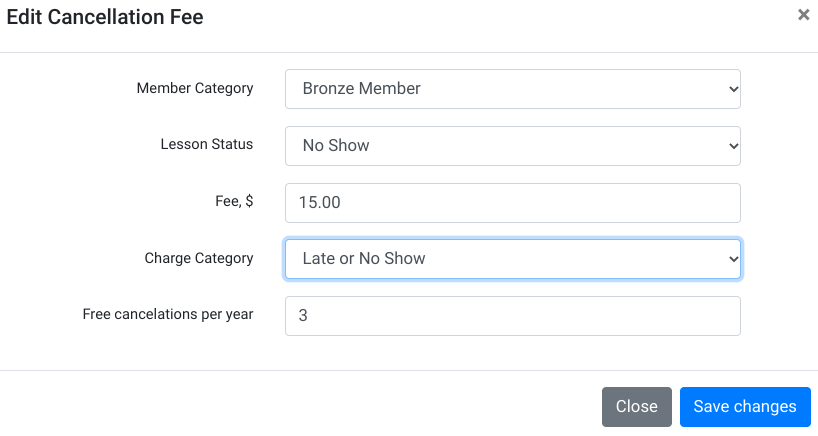
What each rule includes
- Member Category such as Bronze Member, Silver Member, VIP, or Standard.
- Lesson Status such as Late Cancel or No Show. These rules are usually most useful for those two statuses, though the system supports lesson-status based rules more generally.
- Fee, $ which is the fixed dollar amount to charge.
- Charge Category used for the resulting fee charge, such as Late Fee, No Show Fee, or Cancellation Fee.
- Free cancellations per year which lets a member receive a certain number of free occurrences before the fee starts applying.
For example, a studio could create a rule where Bronze Members receive three free no-shows per year and are then charged $15 for each additional no-show.
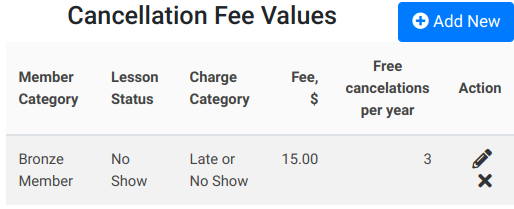
You can create different rules for different member categories. VIP members may receive more free cancellations, while standard memberships may have stricter policies.
How the fee is actually charged
When a student is marked with a qualifying lesson status, such as Late Cancel or No Show, DSM can create a pending scheduled charge rather than an immediate posted charge.
That scheduled charge becomes eligible after the delay period you set in the Cancellation Fee settings. When the scheduled charge process runs and the fee is due, DSM creates the real charge using the scheduled amount and charge category.
If Create Scheduled Payment is enabled and the account has a saved default payment token, DSM can also create a scheduled payment for that fee. That is different from saying every no-show is instantly charged the moment the status is recorded.
A cleaner way to explain the delay setting
The delay before charging is a grace period. It gives your staff a chance to review a late cancel or no-show before the fee becomes a real charge on the account.
Purchase cancellation fee vs. lesson cancellation fee
Lesson Cancellation Fee
Used when a student late-cancels or does not show up for a scheduled lesson or class. These rules are based on member category, lesson status, fixed fee amount, charge category, and free cancellations per year.
Purchase Cancellation Fee
Used when cancelling or refunding a purchase or package. This is a percentage-based fee and should not be confused with the per-lesson late-cancel or no-show fee rules.
Reviewing cancellations
DSM includes a Cancellations report that helps you review how often students are cancelling early, cancelling late, or not showing up.
- Early Cancel
- Late Cancel
- No Show
The report can be filtered by member, member category, class genre, location, instructor, date range, day of week, and time range. That makes it useful for spotting repeat no-shows, evaluating whether a fee policy is working, or reviewing attendance patterns before changing your studio rules.
Frequently asked questions about late cancel and no-show fees
Can DSM charge students for no-shows?
Yes. You can create cancellation fee rules that charge a fixed dollar amount when a student is marked as No Show.
Can different member categories have different cancellation fees?
Yes. Cancellation fee rules are based on member category, so you can create different policies for Bronze Members, VIP Members, Company Members, or any other member category you use.
Can students receive free cancellations?
Yes. Each cancellation fee rule includes a Free cancellations per year field.
Can some classes be excluded from cancellation fees?
Yes. Use Disabled Class Categories to exclude class categories that should not create cancellation fees.
What is the difference between Lesson Cancellation Fee and Purchase Cancellation Fee?
Lesson Cancellation Fees apply to late cancels or no-shows for scheduled classes and lessons. Purchase Cancellation Fee is a percentage used when cancelling a purchase or calculating a refund.
Need help deciding on a cancellation policy?
If you are trying to balance fairness, class-capacity protection, and customer retention, the best setup is usually a simple fee policy with a clear grace period and a reasonable number of free cancellations each year.
If you want help deciding how to configure it in DSM, contact Dance Studio Manager or ask in the support forum.