Dance Studio Manager Feature Guide
Poll Questions: collect important yes/no answers in the Online Client and at checkout.
The Poll Questions feature lets studios ask members important yes/no questions and save those answers directly inside Dance Studio Manager. It is useful for medical information, photo releases, policy acknowledgements, carpool interest, and other studio-specific questions.
Poll questions are not limited to one situation. Depending on how you configure them, they can appear as general Online Client prompts or as required checkout questions that must be answered before a cart can be completed.
Typical uses
- Medical or allergy disclosure
- Photo and video release permission
- Policy acknowledgement
- Carpool or travel coordination interest
Current format
Poll questions currently use a Yes/No answer type. You can also choose whether to show an explanation field for additional detail.
Where answers go
Answers are stored on the member record and can also be reviewed through the Poll Answers report.
- Do you have any allergies or medical conditions that we should know about?
- Do you authorize the studio to use photos or videos for marketing purposes?
- Would you be interested in coordinating a carpool with other students or parents?
Enabling poll questions
Poll Questions may require a few settings and permissions, depending on which staff groups should manage them and which groups should be able to review submitted answers.
- Go to Settings and then Global Settings.
- Search for polls.
- Set Enable polls and questions for members to Yes.

Then review group permissions for any user role that should work with poll questions:
- Go to Settings and then Group Permissions.
- Edit the appropriate group, such as Administrator or Office Admin.
- Enable access to Poll Questions or Polls where appropriate.
- Enable access to the Poll Answers report if that group should be allowed to review answers.
There is also an Online Client setting called Show "Polls" Section. Turn that on if you want members to have a dedicated Polls area in the Online Client, not just alerts or checkout prompts.
Important scope note
Poll questions are not only for registration or checkout. DSM supports both General and Checkout poll questions, and the member experience differs depending on which relation you choose.
Adding a poll question
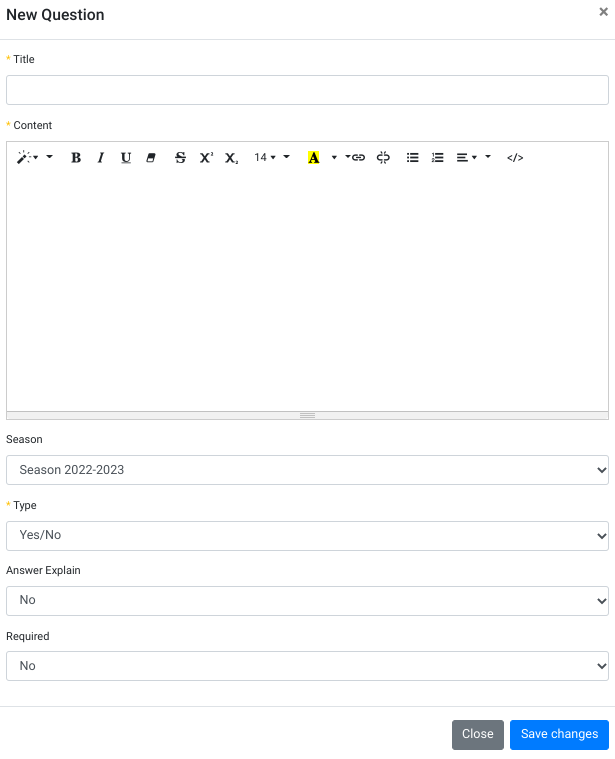
From the Admin Dashboard, go to Settings and then Poll Questions. Click Add New and complete the question form.
What each field means
Title
A short internal label such as Photo Release, Medical Information, or Carpool Interest.
Content
The full question text that the member reads and answers.
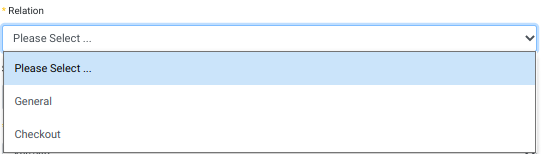
Relation
This controls where the question appears. General questions appear as general Online Client poll prompts. Checkout questions appear during checkout and can block completion if required.
Season
You can assign the question to a season or leave it as Not Selected. In practice, the question is typically filtered to the current season or to no season, so use season-specific questions deliberately.
Type
At this time, the poll question type is Yes/No.
Only to selected Member Categories
Use this when the question should only apply to certain member categories, such as Company members, trial students, scholarship students, or a specific program group.
Answer Explain
This controls whether DSM shows an explanation field along with the Yes/No answer.
Required
This controls whether an unanswered question can prevent checkout from continuing. It does not mean the member must write an explanation. The explanation field is controlled separately by Answer Explain.
The most important correction
If you want members to type an explanation, turn on Answer Explain. If you want unanswered checkout questions to stop checkout, turn on Required. Those are two different behaviors.
How members see poll questions
When poll questions are enabled and an unanswered question applies to the logged-in family or member, DSM can show an alert in the Online Client. Which questions appear depends on the question relation, season, and any member-category targeting you selected.
For General poll questions, members can respond through an alert or through the Polls section if that section is enabled. For Checkout poll questions, the question appears during checkout. If the question is marked required, checkout cannot continue until the member answers it.
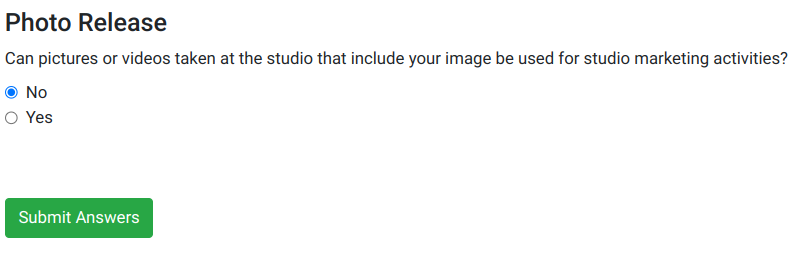
When the member clicks the prompt to answer questions, DSM shows the active unanswered poll questions that apply to them.

A member may see one question or multiple questions, depending on how many active unanswered polls match their account, current season, relation type, and member category.
Reviewing poll answers
Poll answers can usually be reviewed in two practical places:
- Member account for one member or family at a time.
- Poll Answers report when you want to review answers for a specific question across a larger group.
The Poll Answers report can show the member, answer, explanation details, and date submitted. It can also be filtered by class when needed, which makes it easier to review targeted operational questions.
Why this matters
Poll Questions are a lightweight way to collect operational information without building a separate form workflow. When used carefully, they can improve safety, communication, and policy tracking without adding much friction for families.
Frequently asked questions about poll questions
What are Poll Questions in Dance Studio Manager?
Poll Questions are yes/no questions that can be shown to members in the Online Client or during checkout. Studios often use them for medical information, photo release permissions, policy acknowledgements, and similar operational questions.
Can a poll question require an explanation?
Yes. Use the Answer Explain option to show an explanation box when you want more than a simple Yes or No response.
Can poll questions be required?
Yes. If a checkout poll question is marked as required, DSM can prevent checkout from continuing until the member answers it.
Can poll questions be shown only to certain members?
Yes. Poll questions can be limited to selected member categories, which lets you show different questions to different groups of students or families.
Where can I view poll answers?
Poll answers can be viewed on the member account or through the Poll Answers report, depending on whether you want to review one person or a larger set of responses.
Need help deciding how to use poll questions?
If you are not sure whether a question belongs in Poll Questions, a waiver page, a registration field, or another workflow, contact Dance Studio Manager and we can help you choose the cleanest setup for your studio.